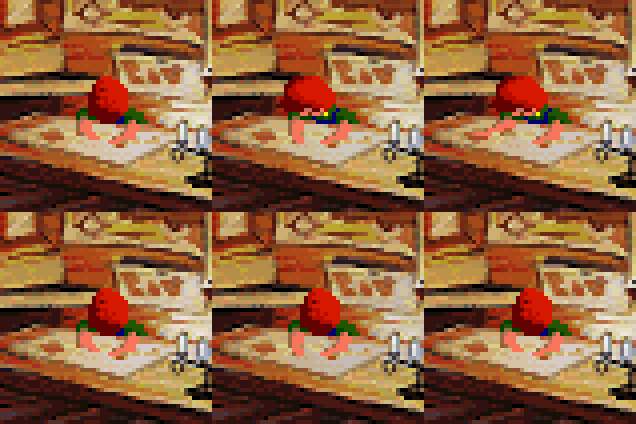
When you first get close to the cigar salesman, you'll lose control of Bernard, who'll walk to a specific spot. Then the cigar salesman will say "Hey, boy, you missed the party!".
If, when that happens, you're in the middle of another cutscene, the two cutscenes will run at the same time. We can use that to gain control of your characters when we're not supposed to.
This is one of the most versatile glitches in the game, offering many possibilities. The bad news is, you can only do it once during a run, so you'll have to choose just one of these possibilities.
Let's start with the easiest one. We'll talk about the rest in part 6: the salesman cutscene and the gum glitch.
This glitch is different depending on whether you play on ScummVM or on other platforms. Here we'll focus on the ScummVM version. If you're playing on other platforms, check part 12: differences between ScummVM and other platforms and part 13: item slides and the quarters cutscene.
Gaining control when talking to the tentacle guard
Back in part 2, we mentioned that you could switch to a different character during a conversation if you started the conversation during a cutscene. This is exactly what you can do thanks to this glitch.
For this to work, you need to unlock Laverne (cherry tree down). But do not switch to Laverne before doing this trick. If you do so, the methods mentioned here won't work (you'll still be able to use the gum glitch, as we'll see in part 6).
Once you've unlocked Laverne, enter the room with the cigar salesman. Let's say you need to open the grating. Do so. Now, click on the right of the screen, below the area where the cigar salesman is, and click on an item in your inventory. Bernard will first walk vertically. The moment Bernard turns to the right, click on Laverne in order to flush the item to her.
If you time it right, the screen will start scrolling right before the start of the cutscene of Bernard trying to flush the item.
Now comes the tricky part. Once Bernard starts saying "I waited, but she never picked it up", press Esc to skip the cutscene and then press "3" to switch to Laverne. She'll start saying "Get me out of here!". Press Esc to skip the cutscene, and right-click on the tentacle guard in order to talk to him. You'll have to be fast here; if you take a couple of seconds before talking to the guard, ScummVM will crash with a message about the cursor state.
Once you're talking to the tentacle, press period once to skip the "Yoo-hoo! Mr. Tentacle Guy" line. The tentacle guard will reply "What?" and, at this point, the cursor will become visible. Now press "1" or "2" to switch to Hoagie or Bernard. You'll be able to continue the conversation as them.
Just as an example, press "2" to switch to Bernard. Then choose the "I don't feel so good" option. Bernard will go to the doctor in the future!
You can see the whole sequence in the getting Bernard/Hoagie to the future flushing items to Laverne video. As fun as it is, currently there aren't any routes that can take advantage of sending Bernard/Hoagie to the future this way.
As far as we know, the tentacle guard conversation is the only one where this glitch works. The reason is that, when you switch to Laverne for the first time, the cutscene of Laverne saying "Get me out of here!" will start. Thanks to this cutscene, the game will wait a bit longer before crashing, and you'll have enough time to start the conversation with the tentacle guard.
Alternative (and faster) methods
Flushing an item to Laverne is by far the easiest way to get this glitch, but there are faster ways to do so.
The first time you flush an item and you aren't next to a Chron-O-John, there's a cutscene of your character saying "I'll just run to the Chron-O-John". You can use that cutscene to get the glitch. It's faster, but you have to be more accurate with your timing. You'll have to do it right when the screen starts to scroll to the right.
You can also look at certain items. Whenever you look at the stamp, the "help wanted" sign, or the flier, the cursor disappears. You can use that to get this glitch. Doing this seems even trickier than flushing an item for the first time, but luckily there's a way to make it more consistent and faster.
Let's use the stamp as an example. Make sure the stamp is visible in your inventory, and remember its position.
As Bernard, open the grating and start walking to the right. Once Bernard starts walking, press "1" to switch to Hoagie.
Position the cursor where the stamp will be when you switch to Bernard. Then press "1" and immediately press Tab (right-clicking also works). Bernard will start looking at the stamp right before the cutscene with the salesman begins. From this point, everything behaves as explained earlier.
The getting Bernard/Hoagie to the future looking at the stamp video shows this approach.
This is the fastest known way to do this glitch because switching to Hoagie and back to Bernard means you won't have to wait for the screen to scroll before the cutscene with the cigar salesman begins.
Giving Red the battery plans and keeping them
Back in part 4, we saw how you could give a battery ingredient to Red and switch to a different character when doing so.
The exact same thing can be done with the patent application (also known as the battery plans).
Get Hoagie to the basement in the past. Then proceed with the cigar salesman glitch as earlier. When the tentacle guard says "What?", press "1" to switch to Hoagie. Then choose "I have to go to the bathroom".
Now, there are two ways to do this glitch; the safe way, and the fast way. The safe way is holding Esc and waiting for Hoagie to stop talking. The fast way is to press period and then pressing Esc to skip the cutscene. Clicking both mouse buttons to skip the cutscene is also an option.
Whichever way you choose, the game will consider you've given Red the battery plans. And, if you're timing has been accurate, you'll still have the plans! To see how that works, check the giving the plans to Red and keeping them video. Notice, how, in the video, there's a moment where Red turns to the right. That means the game considers you've given him the plans.
So far we've found ways to get characters to the past, and to get them to the future. In part 7: the battery plans cutscene, we'll see how you can get Laverne to the present thanks to the plans. But, before that, let's talk about the most versatile way to use the cigar salesman in part 6: the salesman cutscene and the gum glitch.
Under the hood: floor triggers, cutscenes, fakescenes, and cursor state
Floor triggers
Most of the time, the game responds to your actions whenever you interact with something. Could be an item in the current room, a non-playable character, or an exit to a different screen.
However, in some cases, the game responds to your actions once you walk past a certain point. These are known as floor triggers. For example, when you become the three-headed monster near the end of the game, the old purple tentacle will be on the corridor, near the candy machine. When you try to get past him, he'll turn and zap you.
Some floor triggers are activated even when you're in a middle of a cutscene. For instance, if you walk to them while looking at the "help wanted" sign. These are floor triggers that run inside a background script. In the code, background scripts are started with:
start-script bak <script-name>
In the case of the cigar salesman, getting near him will start a cutscene. Or so it would seem. Technically, it won't start a cutscene. You see, there are events that look like cutscenes, but are not exactly cutscenes.
Cutscenes and fakescenes
In SCUMM games, when a cutscene starts, the game pauses every script that is currently running. When the cutscene ends, the game unpauses those scripts. So, if you start cutscene A, and then start cutscene B, the game will pause cutscene A. Once cutscene B is over, cutscene A will resume.
Then, there are places where the game takes control away from you by hiding the cursor and preventing you from entering commands. They look like cutscenes, but they aren't cutscenes. We'll call them "fakescenes" (if you've got a better name, feel free to suggest it).
The main difference between cutscenes and fakescenes is that fakescenes don't pause other cutscenes. So, going back to the salesman, if you start a cutscene while Bernard is walking towards him, when the fakescene starts, both that cutscene and the salesman fakescene will run at the same time.
Cursor state
There's another important difference between cutscenes and fakescenes. On the surface, both make the cursor disappear when they start, and both make the cursor appear when they end. But the way they do it is different.
In LucasArts SCUMM games, there's something called "cursor state". When the cursor state is greater than zero, the cursor is on, and you can control your character. When the cursor state is 0 or less than 0, the cursor is off, and you can't control your character.
(This is not entirely true; what gives you control of your character is another thing called userput. But it usually goes hand-in-hand with the cursor state, so let's forget about userput to simplify things.)
Going back to cutscenes and fakescenes. Fakescenes set the cursor state to 0 when they start, and set the cursor state to 1 when they end.
Cutscenes, on the other hand, decrease the cursor state when they start, and increase it when they end.
Why do cutscenes do that? Once again, let's say you start cutscene A. The game decreases the cursor state, setting it to 0. Then you start cutscene B. The game pauses cutscene A, and decreases the cursor state, setting it to -1. Once cutscene B is over, the game increases the cursor state, setting it to 0. This way, when cutscene A resumes, the cursor state will be 0, and you won't get control of your character during the cutscene.
Let's see the same case with a fakescene. You start cutscene A. The game decreases the cursor state, setting it to 0. Then you start fakescene F. The game sets the cursor state to 0, so nothing changes. Now both the cutscene and the fakescene are running at the same time. Which one will end first? We don't know.
If cutscene A ends first, the game increases the cursor state, setting it to 1. You're still in the middle of a fakescene, but now you can control your character! Once the fakescene is over, everything will be back to normal. However, during the fakescene, you'll be able to do things you're not supposed to do.
Things can get more interesting if fakescene F ends first. The game sets the cursor state to 1, and you get control of your character while cutscene A is still running. And, when cutscene A ends, it increases the cursor state, and sets it to 2! And then... ScummVM crashes with a message about the cursor state. Oops.
Luckily, in most situations, there's a way to avoid the crash. Let's go back to the salesman.
The salesman fakescene
The salesman floor trigger starts a fakescene. If you start a cutscene on your way to the floor trigger, both the cutscene and the fakescene will run at the same time.
The interesting part comes when you press Esc. What happens in this case? It depends. If the cutscene you started was looking at the stamp or flushing an item to Laverne, you'll skip both the cutscene and the fakescene. In part 6, we'll see a different case.
When you skip both the cutscene and the fakescene by pressing Esc, the fakescene will end immediately, setting the cursor state to 1. Then, after a brief pause, the cutscene will end and the game will increase the cursor state to 2. And ScummVM will crash.
The only known way to avoid the crash is to start a conversation. Conversations are like fakescenes, so, when you start a conversation, the game will set the cursor state to 0 for a moment. Then, the cutscene we started with Bernard will end, the game will increase the cursor state to 1, and the game won't crash.
In this case, you won't have enough time to start a conversation, unless immediately switching to a character starts yet another cutscene. This is what happens when you switch to Laverne for the first time. That cutscene gives you just enough time to start a conversation with the tentacle guard before the game crashes. When you do so, the cutscene we started with Bernard will end, the cursor will become visible, and you'll be able to switch a different character.
The other way to avoid the crash would be to start a cutscene that gives you more time and runs in a global script. We'll talk about that in part 6.
Other floor triggers
Other than the cigar salesman, there's another interesting floor trigger in the game: the Franklin floor trigger. We'll talk about it in part 7: the battery plans cutscene.
There's another floor trigger when you move to the left of the screen after getting the gold-plated quill pen. And another one when Hancock, Jefferson and Washington are outside because of the fire alarm (this one is just them saying some random sentences related to the fire alarm). None of them seem to be useful. The first one immediately triggers a cutscene where the list of verbs and the inventory disappear, and the second one doesn't change the cursor state.
Then there's the chattering teeth. This floor trigger starts a real cutscene (not a fakescene), so there's no known way to do anything interesting in this case.
This leaderboard is for runs of Day of the Tentacle on ScummVM.
More details about the different versions covered on this leaderboard in the [Guides section](