



If you are new to speedrunning TrackMania Wii on emulator, I highly recommend submitting a dummy test run to ensure your setup is good. As a verifier, it is heartbreaking to see a new runner pour much effort into breaking a world record, only to miss a required setting in the emulator.
Emulator Gameplay Rules:
Currently, only the dolphin emulator is allowed.
- Replays are banned
- Runs must be recorded live with game audio (hear-able over background music, etc.)
-
Video needs to show the countdown before start (3,2,1, GO!) to when the race result screen is visible after the run (the medal screen)
-
Runs that lag significantly more than a console run on the same track will not be accepted*.
Emulator Settings Rules:
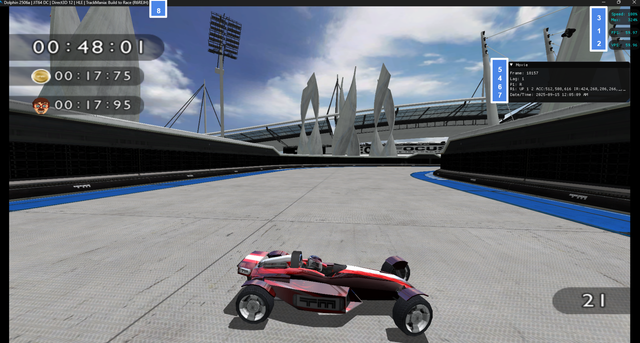
Specific settings must be checked and visible in your recording for your run to be accepted.
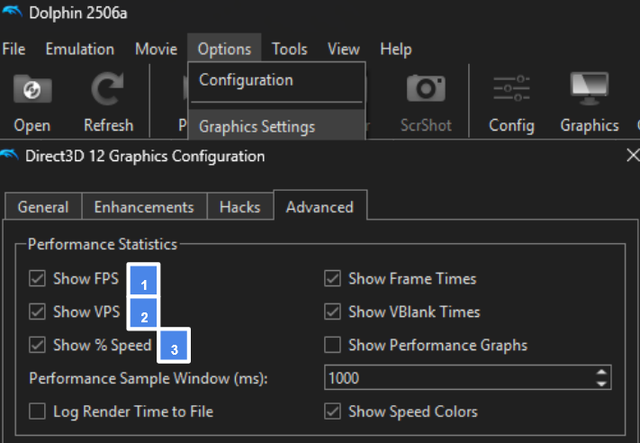
Under Options Tab -> Graphic Settings -> Advanced
☑ Show FPS (1)
☑ Show VPS (2)
☑ Show % Speed (3)
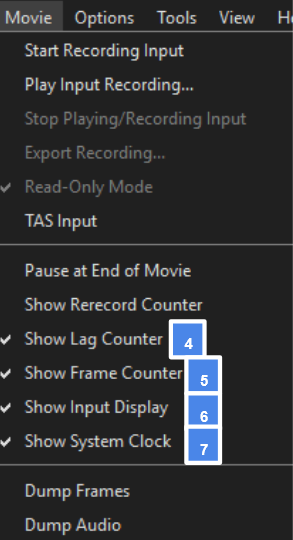
Under Movie Tab:
The box containing these values can be placed anywhere on the screen, given that it is mostly above gameplay (not in the black letterboxing of your screen).
☑ Show Lag Counter (4)
☑ Show Frame Counter (5)
☑ Show Input Display (6)
☑ Show System Clock (7)
Misc:
Dolphin's Program Toolbar (8):

Yes, this means you must play in Windows mode, sorry.
Dolphin on Xbox Settings Rules:
-
A top toolbar is not required, as that feature flat-out does not exist since it is an Xbox.
-
In submission, please note you are on Xbox to avoid the verifier denying it for a different version of Dolphin.
-
Otherwise, follow the rest of the Emulator Settings Rules
Dolphin on Android Settings Rules:
Example of setup:
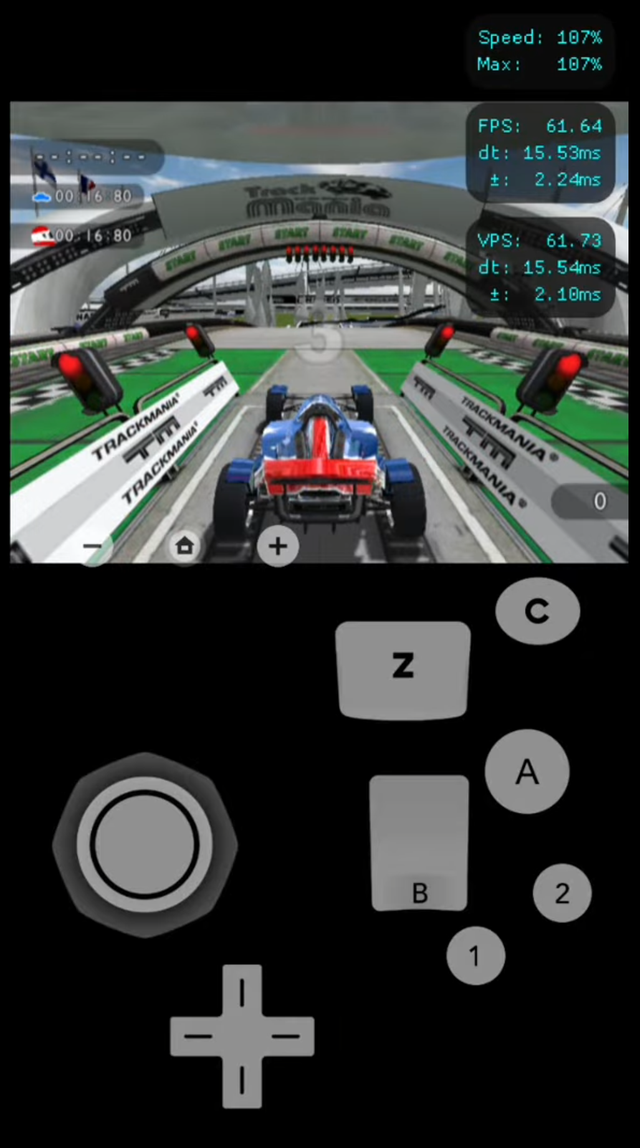
-
The Movie Tab does not exist, so those requirements do not apply
-
Some form of showing your inputs
-
Additional settings:
o under Options Tab -> Graphic Settings -> Advanced
☑ Show Frame Times
☑ Show VBlank Times
-
In submission, please note you are on Android to avoid the verifier denying it for a different version of Dolphin.
-
Otherwise, follow the rest of the Emulator Settings Rules.
Lag Exceptions:
Emulator runs with reasonable lag/slowdown on the track Stadium F5 will be accepted, as this track has significant performance issues. (only track where, regardless of settings and pc specs, it suffers)
Otherwise, lag on your end can be addressed by reviewing the Dolphin settings options for performance improvements. Need help, check out: https://www.speedrun.com/tmwii/guides/e9n8j
Controller Input Rules:
Any custom Controller is allowed given it does not create an unfair advantage/functionality that none of the official hardware controllers have. Rule of thumb: Can I do this on a real wii?

Allowed input Styles (can be combo of):
- Motion Controls (Think wii wheel)
- Binary Buttons: ie ON/OFF, 0% to 100%
- Analog Input: continuous, graduated movement (ie Nunchuk or Classic Controller behaviour)
- latched Buttons: for accessibility/finger fatigue purposes
Banned input styles:
- Action keys: Capping steering sensitivity to fixed mid range values (ie, button has always perfect 60% steering)
- Macros/Turbo/Auto-Fire: automated script of multiple inputs
- Impossible Input combinations: ex. Steering left and right at same time
FAQ:
You can stop reading here if you do not care about background reasoning or tips about the ruleset.
How do I capture the toolbar? Where is it?
The toolbar is only visible while playing in window mode (so it cannot be in Fullscreen mode). Additionally, the toolbar is not captured if you use window or game capture in OBS. You have to use display capture to get it. However, you can use the crop filter to trim your bottom taskbar (start button, etc.).
I do not see an X setting?
-
Make sure you are using the latest version of Dolphin.
-
What device are you using (PC, Xbox, Android)?
-
Otherwise, ask a moderator/verifier.
Rules regarding controller type?
Updated as of July 14th, 2026: Ultimately, as long as a specific input device does not offer an unfair advantage, it is a fair game.
I believe increasing the option of input devices increases accessibility to playing the game. I have seen people play with Wii remotes, a keyboard, Xbox controllers, and even a touchscreen on a phone. Go right ahead if you want to play it with a race sim or even in VR.
That being said, the game was designed around the controllers available on Wii platform. Real Wii runs are on the same board as the emulator ones (rare case in all of speed running), so using a method that only works for emulators/device is unfair to other runners who physical can't access the same tools.
For that reason action keys are banned, as no Wii supported controller type has that feature. Additionally the use of action keys trivializes the completion of tracks to timer based Low Input Strategy (LIS), defeating the purpose of competition that distinguish players based on skill level.
Hall-Effect/Analog keyboard? Allowed given it matches the hardware behaviour of the Wii's thumb stick options.
Custom textures/resource pack?
If it does not offer a gameplay advantage, go right ahead. Most commonly used to import your own custom car skins if you do not like the game's selection.
Why all the rules?
Most speedrun communities flat out ban all emulators to avoid the many headaches that come with them. Performance issues, differing game behaviors, hacks/cheat-codes, TASing, and new cheating methods, to name a few, are factors that each has to be investigated.
Luckily, TM Wii with Dolphin does not suffer from most of these issues, making it one of the rarest games, with the console and emulator running on the same board.
I believe that one key factor for having a lively speedrun community is accessibility. The easier it is to speedrun, the more likely a runner will choose this game. However, there is a conflict to balance. More straightforward rules make it more accessible, but easier to get away with cheating a run.
Dolphin, the emulator, offers many ways to play your copy of the game, increasing accessibility. However, the same program is used to create Tool-Assisted Speedrun (TAS) and mod the game to behave differently (cheating).
So, this ruleset balances accessibility and preventing cheating using Dolphin. I could do the nuclear option, where all emulator runs must be performed on a livestream with a hand-cam, but that is not accessible now.
Feel free to reach out if you have any other questions.
Grace Period to adapt new settings
There is a new setting needed to enabled compared to the old list, but won't come into effect until Sept 28th UTC time zone.
If you submit a run between now and then, I will accept it but I will remind you to fix your settings. After that nope
Today, after 14 months, 17 days of grinding, submitted their 373th TM Wii run, getting the author time on Snow F2, a track widely considered by the community to have the hardest author time in the entire game.
What makes this special, it was a