
Preset chooser?


1 - Press Windows + R and type regedit, then press Enter.
2 - Navigate to the DVloper folder.

3 - Open the Granny 3: Enhanced folder.

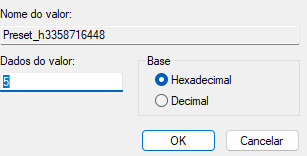
4 - Click on Preset_h3358716448.

5 - Change the value to the desired preset.
Bearbeitet von der Autor


Yeah but it resets after playing a game.
Although you could recreate something like this resouce on Granny 2 (PC): https://www.speedrun.com/granny_2_pc/resources/k4u5p
So instead of having to edit that, you can just open a file every time.


Thank you. By the way, which presets are the fastest for each ending?
YUMmy_Bacon5 und Zanum gefällt das.
BACK TO GAMEJOLT (outdated post)
HELLO LOYAL ENHANCED SPEEDRUNNERS
A few days ago the developer of the game (aka OmGi) uploaded the game to gamejolt AGAIN. Check out "Resources" for the download link!

Kürzliche Durchläufe





Moderatoren
